
Tokens & scopes
API tokens authenticate non-human consumers against /data/* (resolved configs), configuration and external-resource endpoints of the admin API (/api/v1/*), and the MCP endpoint. A token carries a list of scopes, each pairing a source and path glob with a set of operations.
Token format
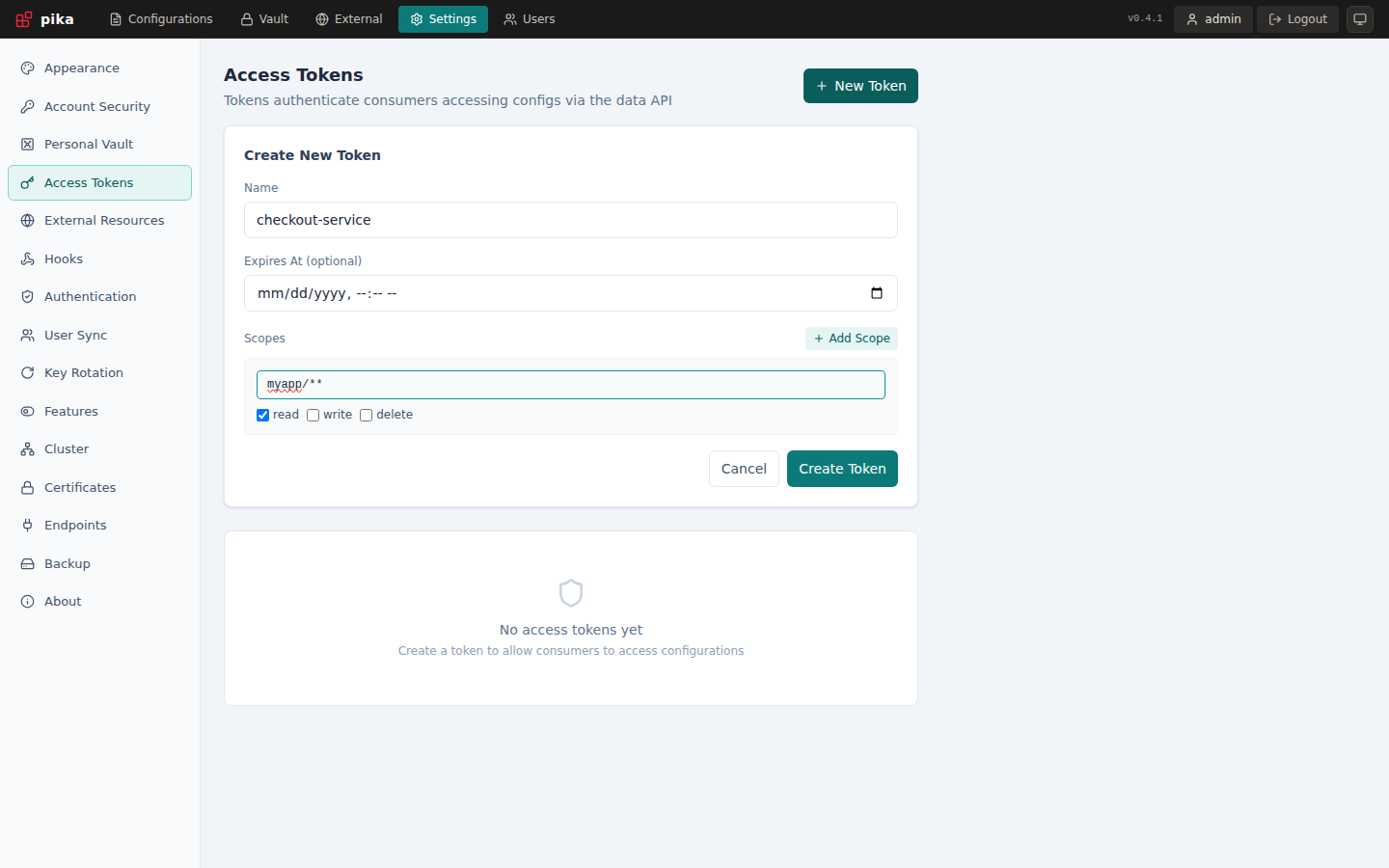
pika_<64-hex-characters>Tokens are minted under Settings > Access Tokens. They're shown once at creation time and stored hashed afterwards — copy them immediately.
Pass tokens via the Authorization header:
curl -H "Authorization: Bearer pika_..." https://localhost:8080/data/myapp/configPika does not accept ?token= query parameters or X-API-Key headers.
Scopes
A scope is { path, operations }:
{
  "path": "myapp/**",
  "operations": ["read"]
}
A request is allowed if any scope on the token matches the requested path with the requested operation.
External resource scopes
Add resource to select one external backend by its exact configured name. Omit it (or leave the UI field empty) for Pika configs:
[
  { "path": "apps/**", "operations": ["read"] },
  { "resource": "production-vault", "path": "team-a/**", "operations": ["read"] },
  { "resource": "consul-dev", "path": "apps/**", "operations": ["read", "write"] }
]
This token can read Pika's apps/**, read team-a/** in production-vault, and read/write apps/** in consul-dev. It cannot delete external entries. These grants work on /api/v1/external/* and MCP. Existing config scopes do not gain external-resource API access, and external grants do not grant access to Pika config paths.
External paths use the same segment glob syntax as configs. Resource names are exact, not globs. Use clean provider-relative paths without traversal, URL query/fragment components or percent-encoding. Resource/path listings and searches are filtered to the allowed scope. In MCP, read-only external scopes expose only external listing, searching and reading tools; write/delete tools are omitted.
Path matching
Scope paths use a small custom glob — segments are split on /:
| Pattern | Matches | Doesn't match |
|---|---|---|
myapp/config | myapp/config | myapp/config/sub, myapp/other |
myapp/* | myapp/foo, myapp/bar | myapp/foo/bar |
myapp/** | myapp/a, myapp/a/b/c | other/a |
** or * (alone) | everything | — |
The matcher is intentionally simpler than filepath.Match or doublestar — there are no character classes or single-char wildcards. Use * for "exactly one segment" and ** for "zero or more segments".
TIP
Scopes apply to /data/{path} on the admin port and to static / consul / custom Endpoints when their auth is set to bearer_token. external Endpoints translate the URL into the underlying provider path before scope matching, so a scope of myapp/** covers GET {endpoint}/myapp/....
Operations
| Operation | Grants |
|---|---|
read | GET /data/..., and reading configurations through /api/v1/* and MCP. |
write | Creating and updating configurations through /api/v1/file/..., /api/v1/folder/... and MCP. |
delete | Deleting configurations and folders. |
* | All of the above. |
A token without any matching read scope gets 403 Forbidden from /data/*.
The data plane itself is read-only — there is no POST /data/... — so write and delete only ever take effect on the admin API and MCP.
Examples
Read-only access to a single app
[
  { "path": "myapp/**", "operations": ["read"] }
]
Read-only across all apps
[
  { "path": "**", "operations": ["read"] }
]
Per-tenant isolation
Mint one token per tenant with a scope like:
[
  { "path": "tenants/{tenant-id}/**", "operations": ["read"] }
]
Wide-open (admin-style) token
[
  { "path": "**", "operations": ["*"] }
]
Use sparingly — ** + * is a master key for every configuration in the server.
Tokens on the admin API
Users are authorized by named capabilities; tokens are authorized by scopes. When a token calls /api/v1/*, pika projects its scopes onto the capability vocabulary the routes check:
| Token operation | Derived capability | Restricted to |
|---|---|---|
read | files.read | the paths granting read |
write | files.write | the paths granting write |
delete | files.write | the paths granting delete |
read with resource | external.read | the named resource and paths granting read |
write / delete with resource | external.write | the named resource, paths and exact operation |
So a token scoped { "path": "team-a/**", "operations": ["read"] } can list and read configurations under team-a/, and nothing else.
Tokens cannot administer the server
There is no scope that yields settings.manage, tokens.manage, users.manage or permissions.manage, so administrative endpoints return 403 for every token regardless of its scopes. External access is possible only through explicitly resource-scoped grants; configuring backends, bulk exports and token management still require an authorized user.
The token can reach only its granted config/external data, never server administration.
Superadmin
Superadmin is a user attribute, not a token attribute. A superadmin user holds every capability implicitly; the forward-auth / OAuth2 Superadmins allowlist promotes matching identities to the same status. A token named after a superadmin gets nothing from that — token identities are resolved from their scopes before the allowlist is ever consulted.
Rotation and revocation
- Rotation — there's no "rotate" action: mint a new token, switch consumers over, delete the old one.
- Revocation — delete the token under Settings → Tokens or via
DELETE /api/v1/tokens/{id}. The change is effective immediately on the local node and propagates to the rest of the cluster withincluster.sync_interval.
Audit
Token use shows up in pika's structured logs under auth.token=<token-id>. Combine with your existing log pipeline for an audit trail.